
FabFilter Micro online help
Table of contents
Go to sectionFabFilter Micro Help
Introduction
Using FabFilter Micro
Presets
Purchasing FabFilter Micro
Support
Input and output options
At the far right, the bottom bar in the interface contains the following input/output options.
The Global Bypass button lets you bypass the entire plug-in. While most hosts already provide the ability to bypass plug-ins, our internal global bypass applies soft bypassing to avoid clicks. While the plug-in is bypassed, a red line at the top of the bypass button appears.
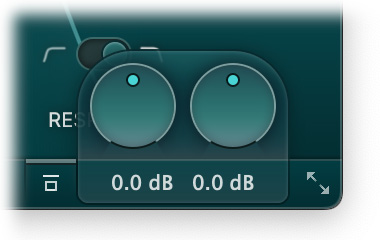
As soon as you hover the mouse over the output button, right next to the bypass button, a panel with input/output/pan knobs will pop up:
- The Input Level knob at the left adjusts the level of the input signal before any processing is applied.
- The Output Level knob at the right adjusts the level of the final output signal.
Next: Scaling
See Also
Using FabFilter Micro
Knobs