
FabFilter Simplon online help
Table of contents
Go to sectionFabFilter Simplon Help
Introduction
Using FabFilter Simplon
Presets
Purchasing FabFilter Simplon
Support
Overview
FabFilter Simplon's interface is, as the name suggests, simple and functional. There are three basic components to FabFilter Simplon: the filters itself, the input/output stage and the MIDI learn functions.
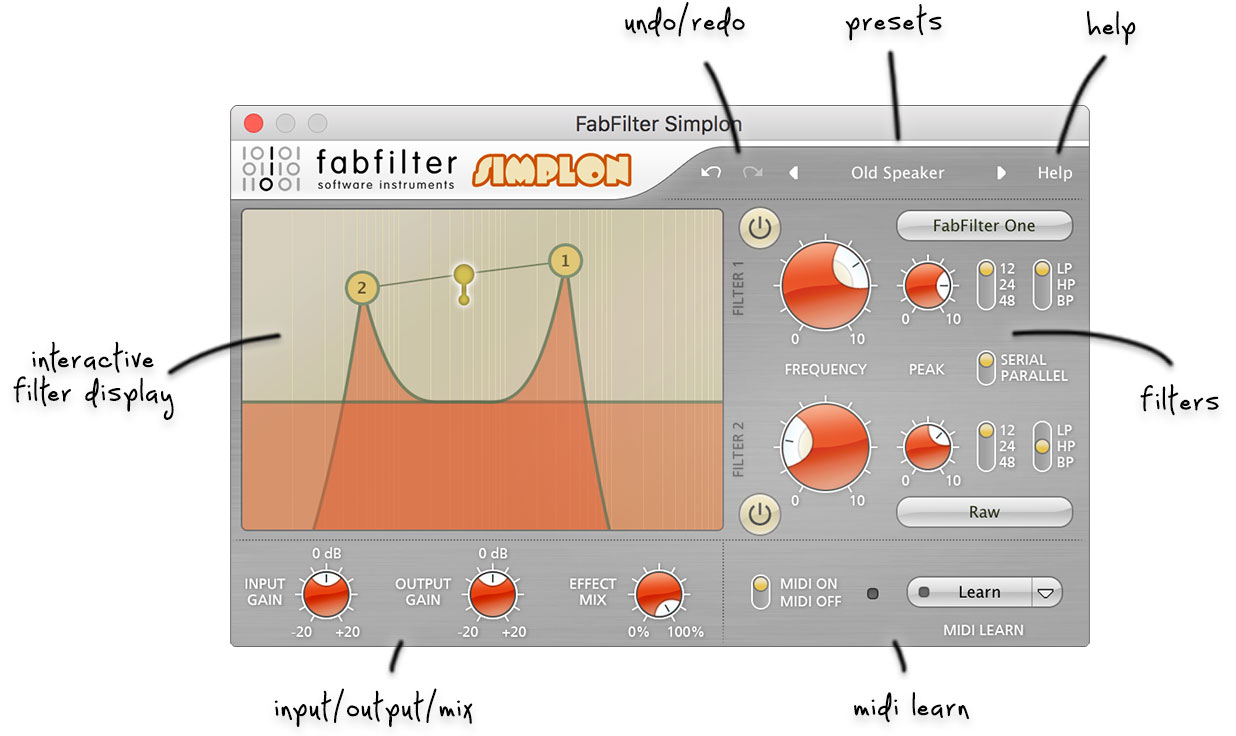
- Interactive filter display
This is the graphic representation of the filter settings which enables you to drag both filters individually or simultaneously and control the filter settings with key combinations. See Filters. - Filter controls
The filters offers pretty much everything you would expect, with a choice of low-pass, high-pass and band-pass modes, and a slope variable from two-pole (12dB/octave) all the way up to eight-pole (48dB/octave). For each filter there are three algorithms that offer three different filter characteristics. See Filters. - Filter routing
The Filter Routing button sets the internal routing of the two filters. They can be routed in serial (one after another) or in parallel (input signal to both filters and then added). - Output options
Here you can control the input and output gain, as well as the mix of the plug-in. - MIDI learn
MIDI Learn offers the possibility to easily associate any MIDI controller with any plug-in parameter. See MIDI Learn. - Presets
With the preset buttons, you can easily browse through the factory presets or save your own sounds so you can re-use them in other songs. See Presets.
Next: Knobs
See Also
Quick start